Meet Maccy.A lightweight, keyboard-first clipboard manager for macOS.
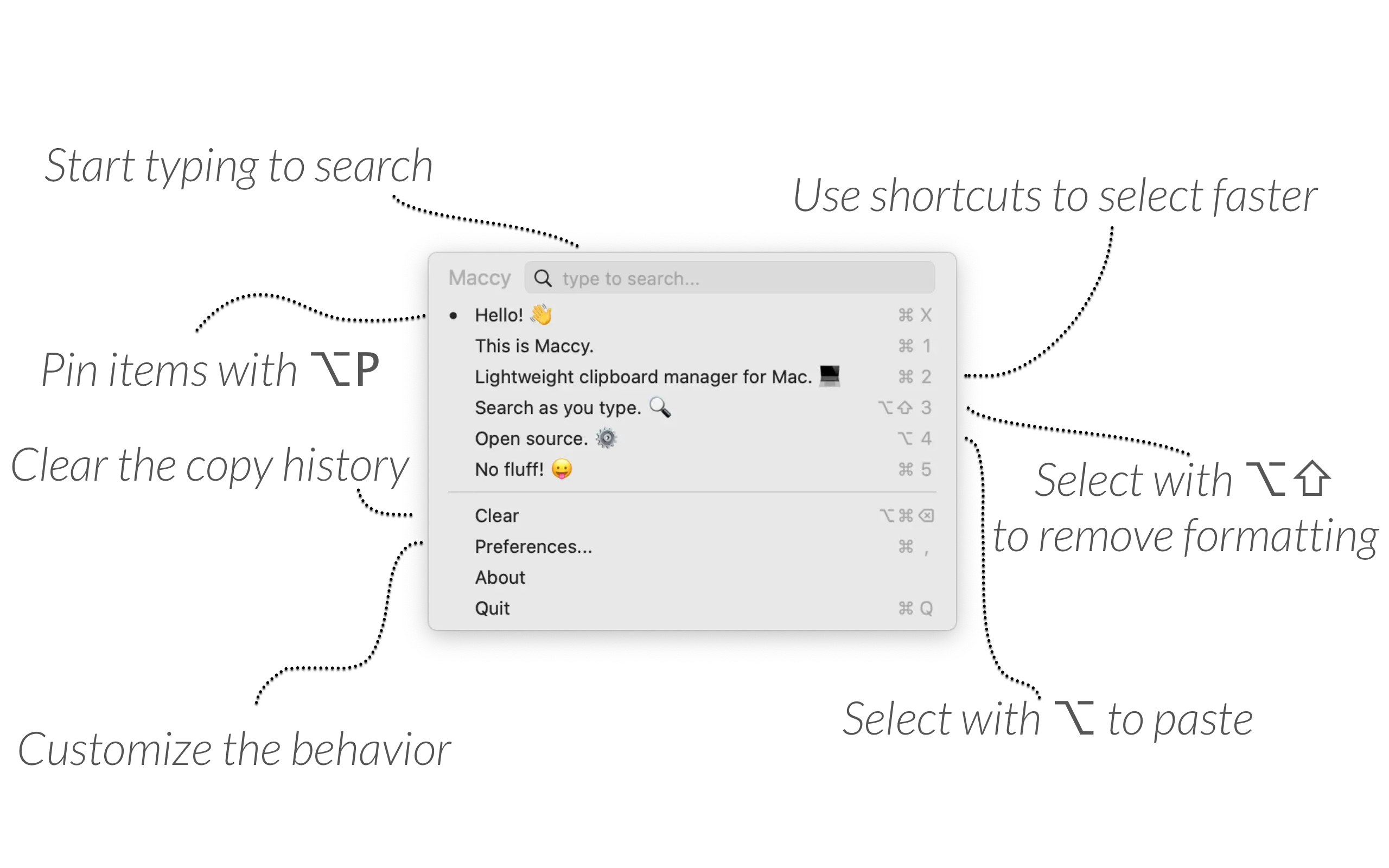
Maccy is a focused clipboard manager that keeps a searchable history of items copied on a Mac. Press its global shortcut, type to filter the history, and select an earlier item to copy or paste it without leaving the keyboard.
The app deliberately keeps its scope narrow: it provides fast clipboard recall in a native Mac interface rather than bundling a larger collection of productivity tools. Text, images, files, links, and rich clipboard formats can be retained, previewed, searched, pinned, or removed according to the configured storage rules.
Features
- Open clipboard history from the keyboard or menu bar and search it as you type.
- Copy an item back to the clipboard, paste it into the active app, or paste without formatting.
- Pin frequently reused items and assign keyboard shortcuts for direct access.
- Preview text and images, including image dimensions, color values, and searchable OCR text in supported releases.
- Configure history capacity, retained content types, popup position, appearance, and keyboard shortcuts.
- Ignore selected applications, regular-expression matches, or custom pasteboard types so sensitive or unwanted copies are not retained.
- Use built-in Shortcuts actions to retrieve, remove, or clear clipboard-history items in automations.
Where it fits
Maccy fits people who want a quick, native clipboard history without a subscription, cloud workspace, or feature-heavy interface. It is especially effective for keyboard-focused workflows where the main requirement is finding and reusing recent text, images, files, or links.
A clipboard manager necessarily observes copied content, which can include private material. Maccy follows transient clipboard markers used by compatible password managers and supports additional ignore rules, but users should still review the retention limit and exclusion settings before relying on it around credentials or confidential data.
Privacy and requirements
Maccy requires macOS 14 Sonoma or later. Clipboard history is stored locally on the Mac, and the developer states that the app does not collect user data. If a compatible password manager marks an item for removal from the system clipboard, Maccy removes its stored copy as well.
Accessibility permission is optional but required for Maccy to paste a selected history item automatically into another application. Copying an item back to the clipboard does not require granting that broader control.
Pricing
Maccy is free and open source under the MIT license when downloaded from the official website, GitHub releases, or Homebrew. The Mac App Store version costs $9.99 as a way to support development and provides the same core application.
 Alfred
 Paste
Paste PastePal
 Raycast
 Tinycast