Meet Paste.The new way to copy and paste on your Mac and iPhone.
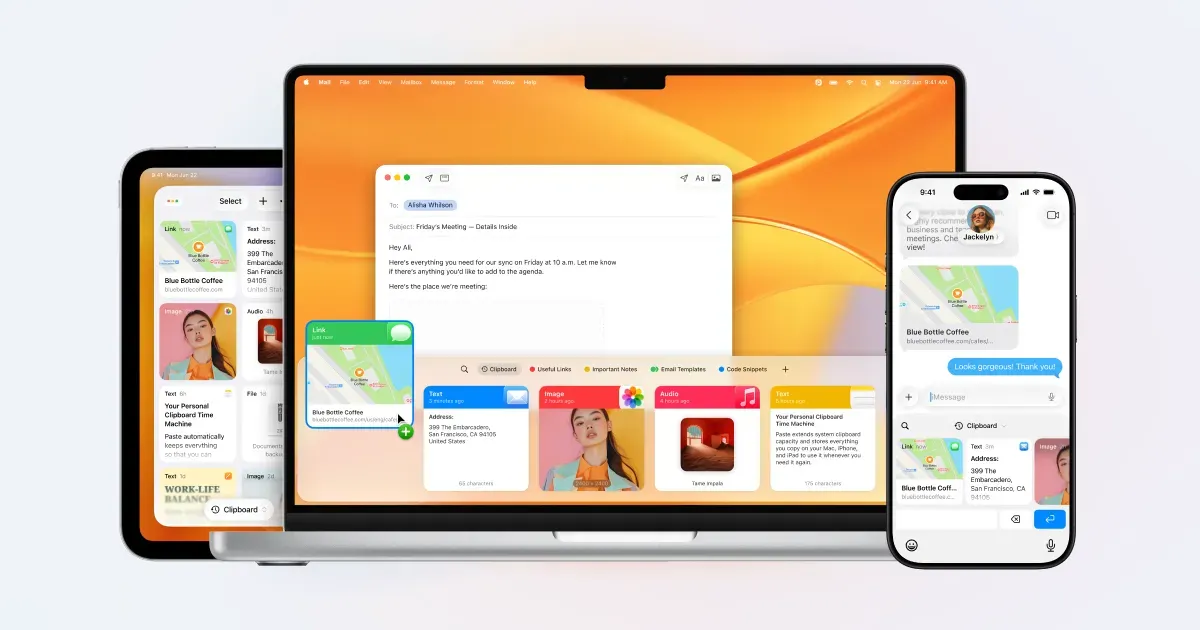
Paste is a clipboard manager for Mac, iPhone, and iPad that keeps a searchable history of copied text, links, images, files, and other content. Instead of losing an item as soon as the next copy happens, you can retrieve it later, organize it, and reuse it from a shortcut in the app you are already using.
It becomes most useful in repetitive work. A writer can reuse excerpts and links, a designer can revisit copied assets, and a developer can recover a command or snippet without rebuilding it from memory or switching through a chain of recent copies.
Features
- Keep an unlimited searchable history of copied text, images, files, links, and other supported clipboard content.
- Filter history by application, date, device, or content type, including search that can recognize text inside screenshots and photos.
- Open Paste from a shortcut in any app, use recent-item shortcuts, and queue multiple items in Paste Stack for sequential pasting.
- Store permanent snippets, templates, and assets on Pinboards instead of letting useful material disappear into the normal history.
- Sync clipboard history and Pinboards across Mac, iPhone, and iPad through the current private iCloud workflow.
- Use privacy rules, screen-sharing protection, capture pause controls, Apple Intelligence Writing Tools, and current MCP integrations where they are appropriate for your setup.
Where it fits
Paste is best for people who copy and reuse many small pieces of information across Apple devices. It is especially valuable for writing, design, support, development, forms, and any workflow where the system clipboard’s single-item limit creates repeated friction.
Because a clipboard history can contain sensitive material, privacy rules need deliberate setup. Users who only need a few local text snippets may prefer a simpler or free clipboard manager.
Privacy and requirements
Paste keeps clipboard history on the device and, when enabled, in the user's private iCloud rather than on Paste's servers. Clipboard managers can nevertheless capture passwords, authentication codes, customer data, and private messages. Configure exclusion rules for password managers and sensitive applications, use screen-sharing protection, and choose a retention period deliberately.
Pricing
Paste is subscription-based: $2.49/month or $29.99/year.
 PastePal
 Raycast
 Maccy
Maccy Tinycast