Meet BetterTouchTool.Greatly customize your Mac input devices.
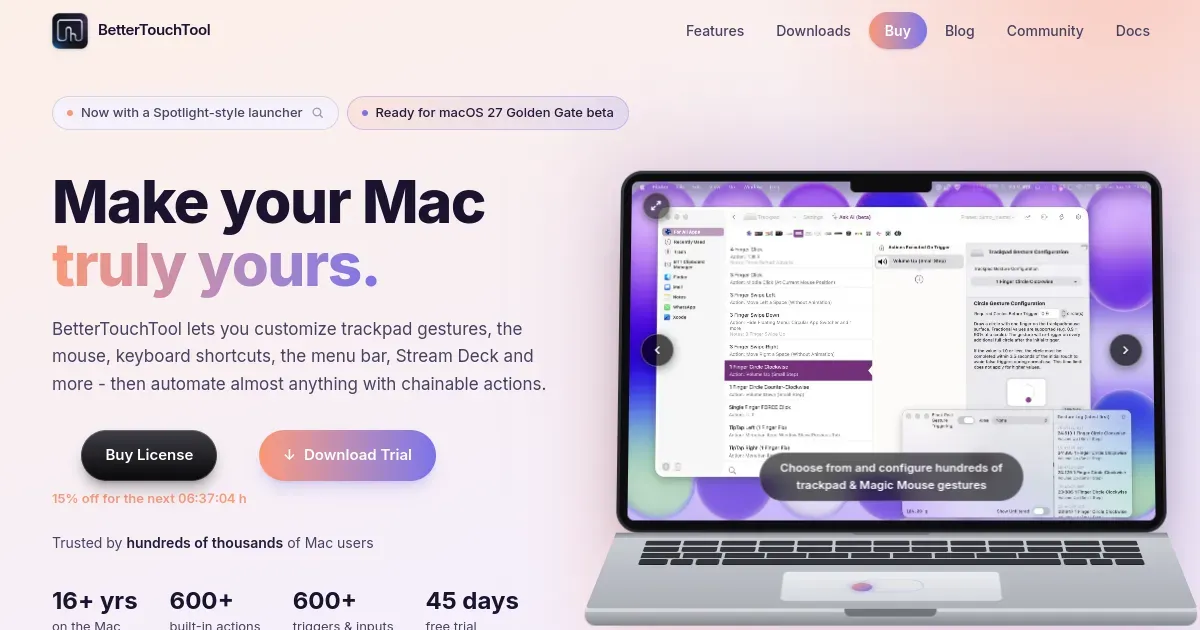
BetterTouchTool is a macOS automation and input-customization utility for trackpads, mice, keyboards, Touch Bar controls, window actions, and system triggers. It lets a person assign gestures, clicks, keys, and contextual conditions to actions that macOS or an app does not expose by default.
Create an action for a repeated interaction—such as snapping a window, controlling media, launching a command, changing a display setting, or running an AppleScript—then bind it to the input that feels natural. This makes it valuable for power users who want a Mac to match an established physical workflow.
Features
- Map keyboard shortcuts, trackpad gestures, mouse buttons, Touch Bar controls, and other input events to custom actions.
- Trigger window management, application commands, system controls, scripts, and automation from an assigned gesture or condition.
- Create app-specific behavior so an input can do different things in different contexts.
- Use automation and trigger tools to connect repeated Mac workflows without writing every integration from scratch.
- Customize Touch Bar, menu-bar, and input interactions where the current macOS and hardware support them.
Where it fits
BetterTouchTool fits advanced Mac users who repeat the same actions often enough to benefit from an input shortcut. It can consolidate several smaller gesture, window, and automation utilities.
It needs Accessibility and related permissions to do its job. Add mappings one at a time, test for conflicts, and keep a way to disable or recover the configuration if an input stops behaving as expected.
Privacy and requirements
BetterTouchTool requires Accessibility access for core functions that control windows and other applications. The developer says update checks send basic system and version data, successful updates send an installation identifier, and license activation sends a salted computer identifier with the transaction ID.
Dropbox receives settings only when optional Dropbox Sync is enabled. Imported presets and scripts should be inspected before use.
Pricing
BetterTouchTool offers a $15 Standard license with two years of updates and a $25 Lifetime license.
 Mac Mouse Fix
 Magnet
 Raycast
 Rectangle
 Swish
Swish Supercharge