
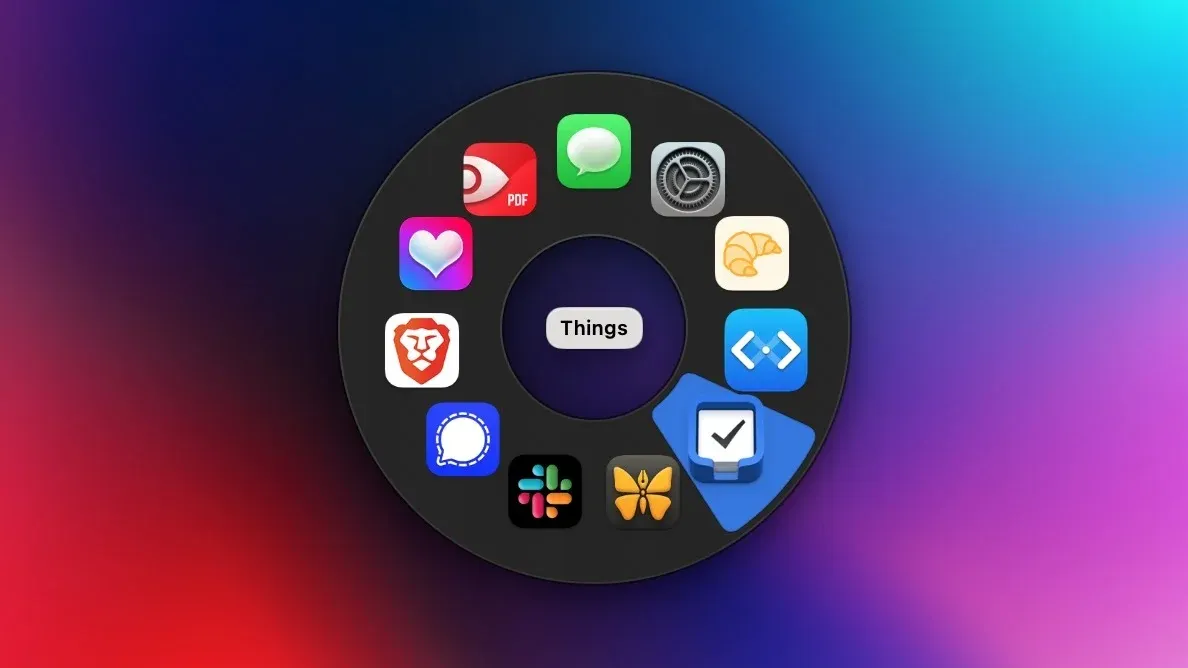
Pieoneer is a macOS launcher that opens applications through a radial pie menu instead of a conventional dock, grid, or text search. Invoke it with a shortcut, move toward the desired slice, and launch the app with a small amount of directional muscle memory.
This is most useful for a compact personal set of frequently used apps. Put daily tools into a pie, use nested menus or additional layouts where available, and keep the launcher near the active pointer rather than moving attention to a fixed part of the screen.
Features
- Launch chosen Mac applications from a radial menu triggered by a shortcut.
- Use spatial direction and pointer movement to build muscle memory for recurring app choices.
- Keep the menu close to the current cursor position rather than navigating to a dock or opening a separate window.
- Configure the app selection and menu arrangement for a personal set of frequent tools.
Where it fits
Pieoneer fits people who prefer a visual, mouse-led launcher and repeatedly open the same group of applications. It can sit beside Spotlight, Raycast, or Alfred rather than replace their search and automation capabilities.
It is most effective with a stable, small menu. A large catalog or constantly changing app set usually benefits more from a text-based launcher.
Privacy and requirements
Pieoneer requires Accessibility access to detect its trigger and present controls over other applications. Actions that launch files, run shortcuts, or connect to services inherit the permissions and privacy behavior of those destinations. It is a local interaction utility rather than a cloud workspace, but imported configurations should still be reviewed before activation.
Pricing
Pieoneer costs $9.99 for a one-time license.
 Alfred
 Raycast
 rcmd
rcmd